
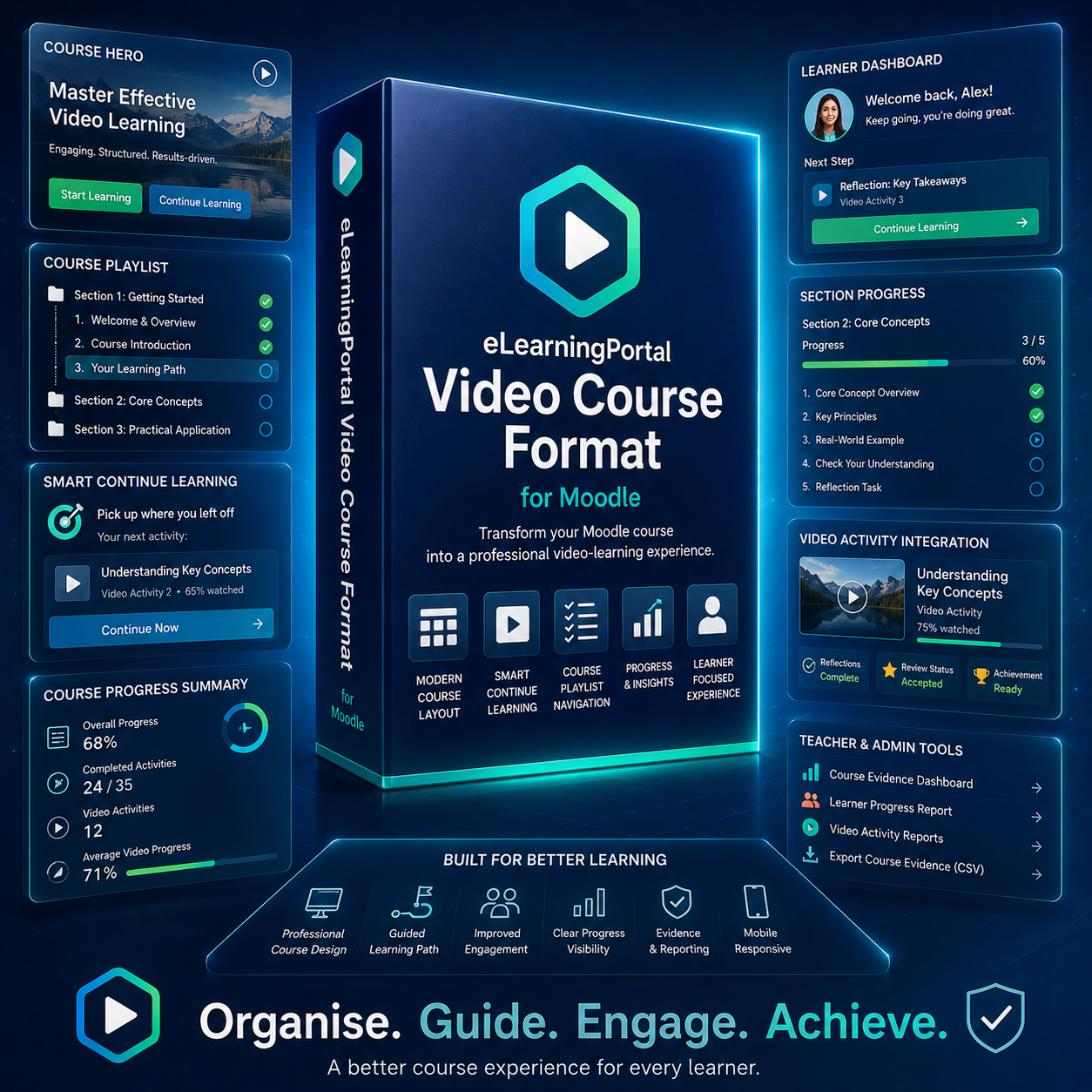
eLearningPortal Video Course Format for Moodle
Product Short Description
Transform an ordinary Moodle course page into a polished, structured, video-course learning experience. The eLearningPortal Video Course Format gives your Moodle course a modern academy-style layout with a course hero section, progress summaries, guided playlist navigation, smart continue-learning buttons, learner dashboard panels, section progress, collapsible modules, and seamless integration with the eLearningPortal Video Activity Plugin.
Ideal for Moodle-based online courses, professional development programmes, workplace training, teacher training, coaching programmes, compliance learning, induction courses, and structured video-based learning pathways.
Product Description
The eLearningPortal Video Course Format is a premium Moodle course format plugin designed to make Moodle courses look and feel like a professional online learning platform.
Instead of displaying a standard Moodle course layout, this plugin organises the course into a clean, learner-friendly video-course experience. Learners can see where they are in the course, continue with the next recommended activity, follow a structured course playlist, track their course progress, and move through lessons using guided navigation.
When used together with the eLearningPortal Video Activity Plugin, the course format becomes even more powerful. It can display video watch progress, reflection status, achievement readiness, course evidence links, and teacher report links directly from the course page.
This plugin is especially useful for organisations that want to deliver structured Moodle courses with a more professional interface, clearer learner navigation, better progress visibility, and a stronger video-learning experience.
Key Features
Modern Video Course Layout
Convert a standard Moodle course into a professional video-course layout.
The course page can include:
Course hero section
Course title and summary
Course progress cards
Start learning button
Continue learning button
Course playlist sidebar
Learner dashboard panel
Section progress indicators
Activity cards
Guided navigation buttons
This helps learners understand the course structure before they begin and makes the learning pathway easier to follow.
Course Hero Section
Display a professional hero area at the top of the course page.
The hero section can show:
Course name
Course description
Course format badge
Start learning button
Continue learning button
Course evidence dashboard link for teachers or administrators
If a course image is available, the plugin can use it as part of the visual course header.
Smart Continue Learning
The plugin can guide learners back to the most relevant next step in the course.
The Continue Learning button can prioritise:
The first incomplete activity
The next video activity not fully watched
A video activity that still needs reflection completion
The next available activity in the learning pathway
This helps learners avoid confusion and continue from the correct point.
Course Progress Summary
Display clear progress cards based on Moodle course completion and activity completion data.
Progress summaries may include:
Overall course progress
Completed activities
Number of video activities
Average video watch progress
Completed video activities
This gives learners an immediate overview of how far they have progressed through the course.
Learner Dashboard Panel
The learner dashboard panel gives learners a quick summary of their current learning position.
It can display:
Next recommended step
Course progress percentage
Videos watched
Reflection completion status when available
Continue Learning button
This creates a more guided and supportive course experience.
Course Playlist Sidebar
The plugin can display a structured course playlist to guide learners through the course.
The playlist can show:
Course sections
Activities within each section
Current lesson indicator
Completion status
In progress status
Needs reflection status
Ready for review status
Section progress
This gives the course a more professional online academy feel and helps learners navigate long courses more easily.
Video Playlist as Learner Menu
The plugin can replace Moodle’s default course index for learners with the eLearningPortal Video Playlist.
This allows the course playlist to become the main learner navigation menu.
Moodle’s standard editing tools remain available to teachers when editing mode is turned on, so course creators can still manage the course using familiar Moodle controls.
Video Activity Integration
When the eLearningPortal Video Activity Plugin is installed, the course format can display richer video-learning information on the course page.
This may include:
Video watch percentage
Video progress bar
Reflection status
Achievement readiness
Video learning activity badge
Teacher progress report links
Course evidence dashboard links
This makes the course page more than a list of activities. It becomes a video-learning dashboard.
Focus Mode Launch Integration
The plugin can launch eLearningPortal Video Activity lessons in focus mode.
When enabled, compatible Video Activity lessons open with focus-mode parameters, allowing the activity plugin to display a cleaner learner-focused lesson page.
This helps reduce distractions and gives learners a more focused video-learning experience.
Non-video Moodle activities still open normally in their standard Moodle activity view.
Video Player Learning Mode
The course format includes a focused learning mode panel that highlights the learner’s current or next recommended lesson.
This panel can show:
Current lesson
Lesson type
Completion status
Video progress
Previous activity button
Open full lesson button
Next activity button
Lesson overview
This gives the course page a more structured, guided learning pathway.
Guided Navigation Buttons
Learners can move through the course using guided navigation.
Navigation options may include:
Previous activity
Continue next incomplete activity
Next activity
This is useful for courses where learners need to follow a sequence.
Collapsible Course Sections
Course sections can be displayed as collapsible modules.
Each section can include:
Section title
Section summary
Section progress
Activity cards
Progress bar
Completion count
This helps keep long Moodle courses tidy and easier to navigate.
Section Progress Indicators
Each section can show its own progress summary.
Example:
Section progress: 3 / 5 activities complete
This helps learners understand their progress not only across the whole course, but also within each module or section.
Cleaner Activity Cards
Activities are displayed as modern course cards rather than a plain list.
Activity cards may show:
Activity title
Activity type
Completion status
Availability information
Video progress
Reflection status
Achievement status
Teacher report links where permitted
Video activities can be visually highlighted so learners can easily identify the main video lessons in the course.
Course Communication Exclusion
The plugin can exclude general course communication items from the learning pathway.
By default, items such as the course introduction section and Announcements forum can be excluded from:
Continue learning logic
Next step recommendations
Course playlist
Progress calculations
Video player learning mode
This helps prevent learners from being directed to announcements or course notices when they are trying to continue with the actual learning pathway.
Teachers can enable these items if they want them included.
Teacher and Administrator Links
Teachers and administrators can see useful report links when they have the correct Moodle permissions.
These may include:
Progress report links
Course evidence dashboard links
Video activity evidence links
Learners do not see teacher-only report links.
Course Evidence Dashboard Integration
When the eLearningPortal Video Activity Plugin is installed, the course format can link teachers and administrators to the course-level evidence dashboard.
This helps staff review:
Learner progress
Video completion
Reflection completion
Review readiness
Achievement evidence
Learners needing support
This is especially useful for evidence-based training and structured learning programmes.
Customisable Course Format Settings
Teachers and course creators can control how the course layout appears.
Settings may include:
Show course hero section
Show course progress summary
Show section numbers
Show activity icons
Show teacher report links
Highlight eLearningPortal Video Activities
Show video watch progress
Show reflection status
Show achievement readiness
Use smart continue learning
Show course playlist sidebar
Show learner dashboard panel
Show guided navigation buttons
Use collapsible sections
Use Video Playlist as learner menu
Choose layout density
Choose hero colour style
Launch Video Activity in focus mode
Include or exclude course introduction section
Include or exclude Announcements
This makes the format flexible for different types of Moodle courses.
Editing Mode Safety
When Moodle editing mode is turned on, the plugin shows Moodle’s standard editing layout.
This ensures teachers and course creators can still:
Add activities
Move activities
Edit sections
Hide or show resources
Manage completion settings
Use Moodle’s activity chooser
Use normal Moodle editing tools
The custom video-course layout is shown mainly for the learner-facing course view.
Mobile-Friendly Layout
The course format is designed to work across desktop, tablet, and mobile views.
The layout adjusts so learners can access the course pathway, activity cards, playlist, and progress information on different screen sizes.
Secure Commercial Licensing
The plugin includes a commercial licence activation framework for controlled distribution.
Licensing features include:
Product key activation
Product slug configuration
WordPress licence bridge integration
Signed licence token validation
Public signing key support
Daily scheduled licence validation
Grace-period handling
Domain/site binding
SSL validation setting
Privacy-safe licence validation
Admin-only licence notices
Licence diagnostics page
The default product slug is:
epvideocourse
Privacy-Safe Licence Validation
Licence validation sends only the information required to validate the product licence.
This may include:
Licence key
Product slug
Site URL
Site fingerprint
Plugin version
Moodle version
PHP version
Environment type
Activation token
The licence server does not receive learner names, learner emails, grades, course content, course names, video progress data, reflection responses, or assessment data.
Who Is This Plugin For?
This plugin is ideal for:
Moodle administrators
Online course creators
Schools and colleges
Training providers
Corporate learning teams
Compliance training providers
Professional development providers
Teacher training providers
Instructional designers
Facilitators and assessors
Coaching programme providers
Organisations selling Moodle-based online courses
Organisations wanting a more professional Moodle course interface
Common Use Cases
Use this plugin for:
Moodle video courses
Teacher training programmes
Workplace learning courses
Compliance training
Staff induction programmes
Professional development courses
Flipped classroom learning
Coaching programmes
Course-based video learning
Structured learning pathways
Online academies
Paid Moodle courses
Evidence-based training programmes
Example Learning Flow
Teacher creates a Moodle course.
Teacher selects the eLearningPortal Video Course Format.
Teacher adds sections or modules to the course.
Teacher adds Moodle activities and resources.
Teacher adds eLearningPortal Video Activities where video tracking is needed.
The course page displays a professional video-course layout.
Learner clicks Start Learning or Continue Learning.
Learner follows the guided course playlist.
Learner completes video activities, reflections, quizzes, assignments, or other learning tasks.
The course page updates progress and next-step guidance.
Teacher reviews learner progress using the available report and evidence links.
Moodle Requirements
Recommended requirements:
Moodle 4.2 or later
PHP version supported by your Moodle installation
HTTPS-enabled Moodle site
Cron configured correctly
Moodle activity completion enabled for progress tracking
eLearningPortal Video Activity Plugin installed if video watch progress, reflections, achievement readiness, and evidence dashboards are required
What Is Included
This product includes:
Moodle course format plugin: eLearningPortal Video Course Format
Academy-style course layout
Course hero section
Course progress summary
Smart continue-learning logic
Course playlist sidebar
Learner dashboard panel
Video player learning mode
Guided navigation buttons
Collapsible course sections
Video Activity integration display
Focus-mode launch integration
Teacher report link support
Course evidence dashboard link support
Commercial licence activation framework
Licence diagnostics page
Scheduled licence validation task
Installation documentation
Configuration guidance
Manual testing checklist
Important Licence Notice
This plugin is licensed for use according to the licence purchased.
A valid product key may be required to activate commercial features. Licence activation may be bound to the registered Moodle site URL and licence tier.
This product uses licence activation, signed tokens, domain binding, feature gating, diagnostics, scheduled validation, and update control to discourage unauthorised use.
Relationship to the eLearningPortal Video Activity Plugin
The eLearningPortal Video Course Format and the eLearningPortal Video Activity Plugin are designed to work together.
The Video Course Format controls the course layout, learner pathway, playlist, progress display, guided navigation, and professional course presentation.
The Video Activity Plugin controls the individual video learning activity, including video progress tracking, chapters, checkpoints, reflections, teacher review, achievement evidence, Gradebook integration, badges, certificates, and detailed video reports.
For the best experience, both plugins should be used together.
Support
Support is available for installation, activation, configuration, and troubleshooting according to the support package included with your purchase.
Recommended support contact:
Product Summary
The eLearningPortal Video Course Format is a professional Moodle course layout plugin for creating structured, learner-friendly video courses.
It transforms the Moodle course page into a guided learning pathway with a modern course hero, progress summaries, playlist navigation, smart continue learning, learner dashboard panels, section progress, activity cards, and integration with the eLearningPortal Video Activity Plugin.
It is designed for serious Moodle course creators who want their courses to look more professional, guide learners more clearly, and support evidence-based video learning.


Reviews
There are no reviews yet.