
eLearningPortal Video Activity Plugin for Moodle
Product Short Description
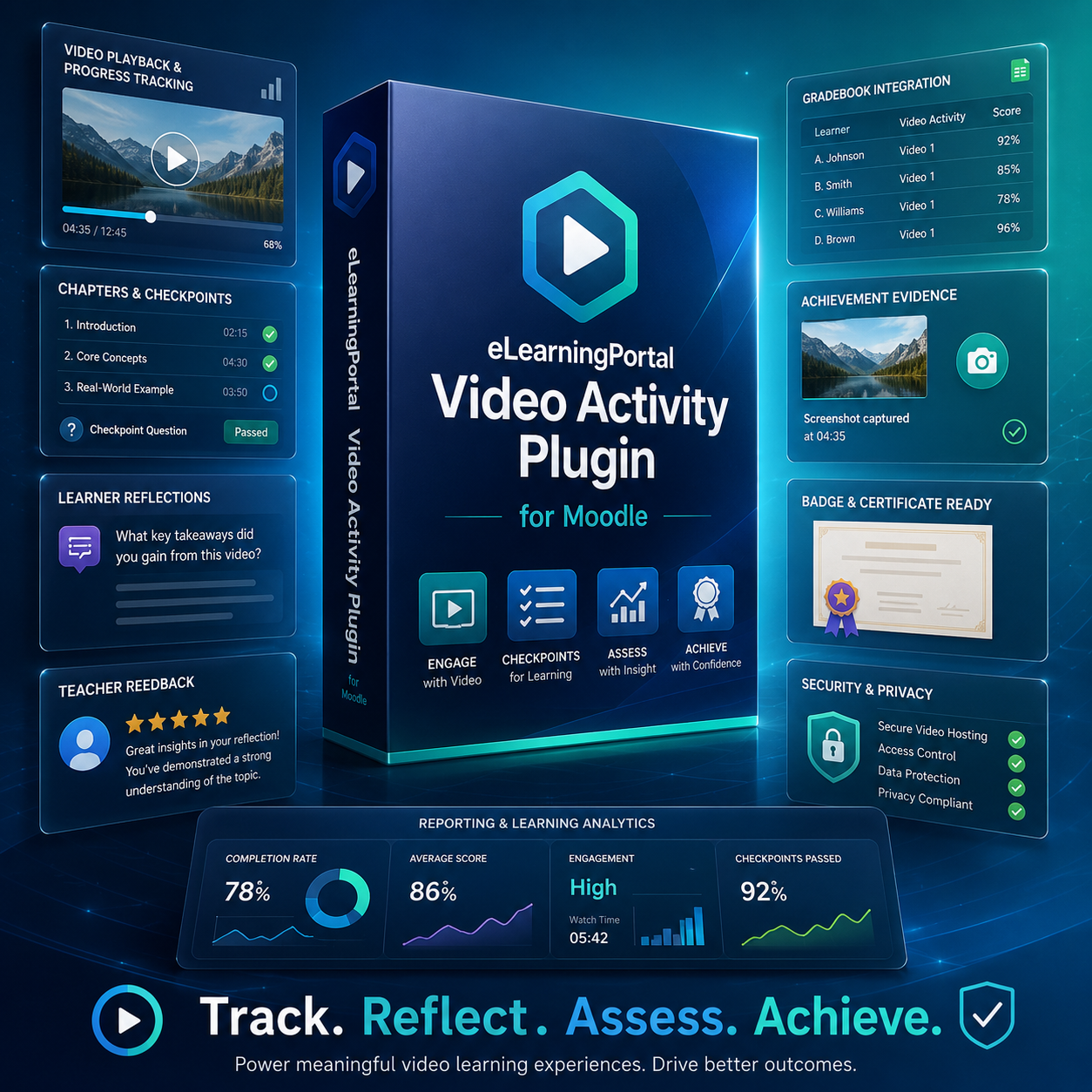
Transform ordinary Moodle video lessons into structured, trackable, evidence-based learning activities. The eLearningPortal Video Activity Plugin allows teachers, trainers, and course creators to add videos with learner progress tracking, chapters, checkpoints, reflections, teacher feedback, Moodle Gradebook integration, achievement evidence, badges, certificates, and course-level reporting.
Ideal for Moodle training, online courses, professional development, workplace learning, compliance training, and evidence-based learning programmes.
Product Description
The eLearningPortal Video Activity Plugin is a premium Moodle activity module designed to make video-based learning more interactive, measurable, and evidence-driven.
Instead of simply embedding a video in a Moodle course, this plugin allows you to create a complete learning activity around the video. Learners can watch videos, resume where they stopped, move through structured chapters, respond to learning checkpoints, receive teacher feedback, and generate evidence of completion.
For teachers, trainers, facilitators, and administrators, the plugin provides powerful reporting tools that show learner progress, reflection responses, review status, support needs, achievement readiness, and Moodle Gradebook outcomes.
This plugin is especially useful for organisations that need to prove learner engagement, monitor progress, support learners at risk, and issue badges or certificates based on meaningful learning evidence.
Key Features
Video Playback and Tracking
Add video-based learning activities directly into Moodle.
Supports:
- Uploaded video files
- Direct video URLs
- YouTube videos
- Embedded video content from approved providers
The plugin tracks learner watch progress and allows learners to resume from their last watched position.
Watch Percentage Completion
Set a required watch percentage before the activity can be considered complete.
Example:
- Learner must watch at least 80% of the video
- Progress is tracked automatically
- Completion status updates when the requirement is met
This helps ensure that learners do more than simply open the activity.
Video Chapters
Divide your video into clear learning sections.
Example:
- Introduction
- Key Concept
- Demonstration
- Practice Task
- Reflection
- Summary
Learners can jump to specific sections using chapter buttons, making the video easier to navigate and review.
Learning Checkpoints
Add checkpoint prompts at specific points in the video.
Checkpoints help learners pause, reflect, and connect the video content to the learning task.
Example checkpoint prompts:
- What is the main idea from this section?
- How would you apply this in your own course?
- What step must be completed before moving forward?
- What did you learn from the demonstration?
Learner Reflection Responses
Learners can type and save written responses for each checkpoint.
This turns the video activity into an evidence-based learning task where learners demonstrate understanding, not just attendance.
Teacher Review and Feedback
Teachers and facilitators can review learner checkpoint responses and mark them as:
- Not reviewed
- Reviewed
- Accepted
- Needs improvement
Teachers can also add written feedback for each learner response.
This supports formative assessment, guided reflection, and learner improvement.
Bulk Review Tools
Save time by reviewing multiple learner responses at once.
Teachers can apply a shared review status and feedback message to selected learner responses, making the plugin suitable for larger classes and training groups.
Learner Intervention Dashboard
The plugin identifies learners who may need support.
Learners can be grouped into support categories such as:
- Not started
- Watching incomplete
- Reflections incomplete
- Needs improvement
- Ready for review
- Completed
This allows facilitators to quickly identify who needs follow-up support.
Moodle Gradebook Integration
The plugin can connect to Moodle Gradebook when enabled.
Supported grade calculation methods include:
- Video progress
- Reflection review status
- Combined video and reflection score
- Completion state
- Achievement readiness
Gradebook integration is controlled and opt-in, so teachers can decide whether the activity should contribute to course grades.
Achievement Evidence
The plugin provides a structured achievement evidence view showing whether the learner has met the required learning conditions.
Achievement evidence may include:
- Required video watch percentage
- Reflection completion
- Teacher review status
- Accepted checkpoint responses
- Gradebook score
- Completion status
- Badge readiness
- Certificate readiness
This is useful for compliance, workplace training, professional development, and course completion evidence.
Badge and Certificate Support
The plugin supports links to Moodle badges and certificate activities.
You can connect the plugin to:
- Moodle badges
- Custom Certificate activities
- Course completion pathways
- Achievement evidence reports
This allows learners to access badges and certificates after meeting the required activity conditions.
Course-Level Evidence Dashboard
Teachers and administrators can view evidence across all eLearningPortal Video Activities in a course.
The course-level dashboard helps answer questions such as:
- Which learners completed the required video activities?
- Which learners submitted reflections?
- Which learners need feedback?
- Which learners are ready for achievement?
- Which learners need intervention?
CSV Exports
Export reports for administration, evidence records, and facilitator follow-up.
Available exports may include:
- Learner progress
- Reflection responses
- Teacher review status
- Intervention evidence
- Achievement evidence
- Course-level evidence
CSV exports are protected against spreadsheet formula injection.
Secure Commercial Licensing
The plugin includes a product-key activation framework designed for commercial distribution.
Licensing features include:
- Product key activation
- Domain/site binding
- Signed licence tokens
- Feature gating by licence tier
- Grace-period handling
- WordPress/WooCommerce licence bridge support
- Privacy-safe licence validation
No learner names, learner emails, grades, course names, or reflection responses are sent to the licence server.
Who Is This Plugin For?
This plugin is ideal for:
- Moodle administrators
- Online course creators
- Schools and colleges
- Training providers
- Corporate learning teams
- Compliance training providers
- Professional development providers
- Instructional designers
- Facilitators and assessors
- Organisations needing evidence-based learner tracking
Common Use Cases
Use this plugin for:
- Moodle video lessons
- Teacher training
- Workplace learning
- Compliance training
- Induction programmes
- Professional development courses
- Flipped classroom videos
- Reflection-based learning
- Coaching programmes
- Evidence-based assessment
- Course completion pathways
- Badge and certificate readiness
Example Learning Flow
- Teacher adds a video activity to Moodle.
- Teacher sets a required watch percentage.
- Teacher adds chapters and reflection checkpoints.
- Learner watches the video.
- Learner submits checkpoint reflections.
- Teacher reviews the learner’s responses.
- Moodle completion and Gradebook rules are applied.
- Learner becomes eligible for badge or certificate access.
- Teacher exports evidence if needed.
Moodle Requirements
Recommended requirements:
- Moodle 4.2 or later
- PHP version supported by your Moodle installation
- HTTPS-enabled Moodle site
- Cron configured correctly
- Moodle Gradebook enabled if grading is required
- Moodle badges or Custom Certificate plugin if badge/certificate workflows are required
What Is Included
This product includes:
- Moodle activity plugin: eLearningPortal Video Activity
- Video tracking tools
- Reflection and feedback tools
- Reporting dashboards
- Gradebook integration
- Achievement evidence tools
- Licence activation framework
- Installation documentation
- Security and privacy documentation
- Manual testing checklist
Important Licence Notice
This plugin is licensed for use according to the licence purchased.
A valid product key may be required to activate commercial features. Licence activation may be bound to the registered Moodle site URL and licence tier.
This product uses licence activation, signed tokens, domain binding, feature gating, diagnostics, and update control to discourage unauthorised use.
Support
Support is available for installation, activation, configuration, and troubleshooting according to the support package included with your purchase.
Recommended support contact:
Product Summary
The eLearningPortal Video Activity Plugin is more than a video player. It is a complete Moodle learning-evidence tool that helps teachers and organisations track video engagement, collect learner reflections, review understanding, support learners, integrate with Gradebook, and prepare learners for badges or certificates.
It is designed for serious Moodle course creators who want video learning to be structured, measurable, secure, and evidence-based.

Reviews
There are no reviews yet.